How to Know If Someone Blocked You on Instagram: 8 Clear Signs in 2026
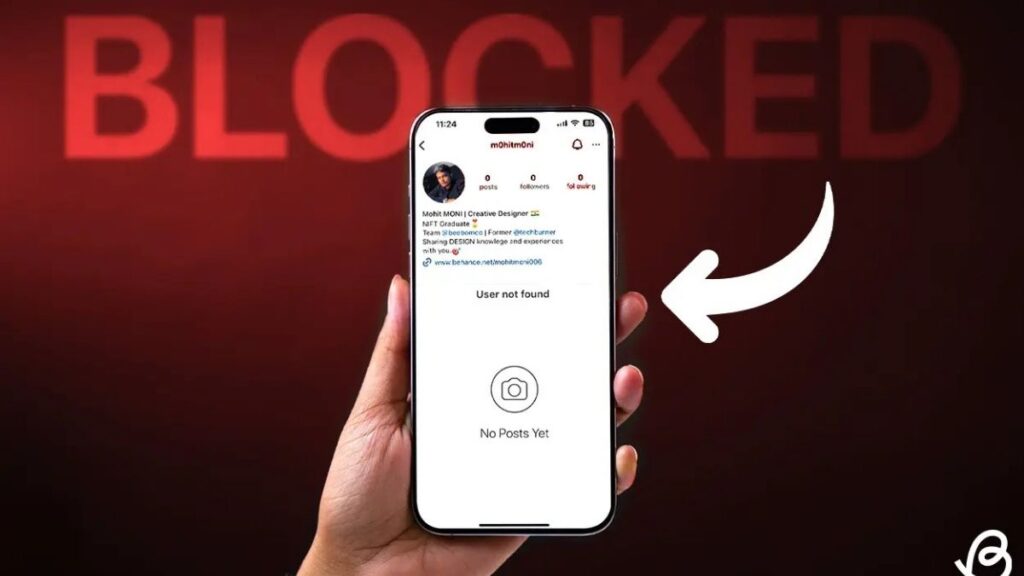
Have you ever wondered why your favorite follow suddenly went silent on Instagram? You stop seeing their stories, your likes on their posts vanish into thin air, and searching for them feels oddly fruitless. Many users face this exact situation every day. Learning how to know if someone blocked you on Instagram helps bring clarity and peace of mind without jumping to conclusions.
Instagram doesn’t send notifications when someone blocks you. This design choice keeps things private but leaves plenty of room for doubt. Fortunately, clear signals exist in 2026 that distinguish a block from other scenarios like deactivation or a simple unfollow.
Why People Block Others on Instagram
People block for countless reasons. Sometimes it’s to create distance after an argument. Other times, it’s to protect mental health from unwanted attention or drama. Understanding this context prevents taking it too personally.
Blocks happen more often than you might think. Whether it’s an ex, former friend, or even a brand protecting its space, the platform gives users full control over their interactions. But once it happens, recognizing the signs saves you time and emotional energy.
Key Signs Someone Has Blocked You on Instagram
Several reliable indicators point toward a block. Let’s walk through the most common ones step by step.
1. Their Profile Disappears from Your Search Results
Open the Instagram app and type their exact username in the search bar. If nothing comes up — or their account briefly appears but won’t load — this serves as a strong clue.
Try this test: Search from a secondary account or ask a friend to look them up. If the profile loads perfectly for them but not for you, you’ve likely been blocked.
Search Behavior Comparison
| Scenario | Your Account Search | Friend’s Account Search | Likely Status |
|---|---|---|---|
| Block | No results or “User not found” | Full profile loads | Blocked |
| Deactivated | No results anywhere | Also no results | Account inactive |
| Unfollowed | Profile appears normally | Same | Just unfollowed |
This simple comparison clears up most confusion quickly.
2. You See “No Posts Yet” on Their Profile
Even if you can access their profile somehow, look closer. Public accounts normally show a grid of photos. When blocked, you often see the message “No Posts Yet” even though the follower count remains visible. This mismatch is a classic giveaway.
3. Changes in Your Direct Messages
Check old conversations. When blocked, their profile picture in the chat often turns into a generic placeholder. Messages you send may not deliver, and you won’t see their typing indicators or online status anymore.
Previous likes and comments from them on your posts might also disappear. Instagram removes that visibility on your end after a block.
DM Differences Before and After Block
| Feature | Before Block | After Block |
|---|---|---|
| Profile Picture in Chat | Visible | Generic placeholder |
| Message Delivery | Instant | Often fails |
| Story Replies | Visible | Not delivered |
| Typing Indicators | Shows | Disappears |
These shifts happen subtly but become obvious once you know what to watch for.
4. Their Stories and Activity Vanish from Your Feed
You used to see their daily stories and Reels. Suddenly, nothing appears. While they might have simply stopped posting, consistent absence combined with other signs strengthens the block theory.
5. Browser Test with Incognito Mode
For extra confirmation, try this reliable 2026 method. Open a browser in incognito mode and visit instagram.com/[theirusername]. If their full profile loads there but not in your app, it confirms the block. Your logged-in session reveals the restriction.
6. Follow Button Issues
If you try to follow them again and get errors or no response, that’s another red flag. The platform prevents blocked users from interacting in these ways.
7. Comments and Tags Disappear
Old comments they left on your content may vanish. Tagged photos stop showing up. This retroactive cleanup is common after blocks.
8. No Mutual Friends Activity
Mutual friends might still interact with them normally. If you notice this pattern, it further confirms the issue is one-sided.
How to Distinguish Block from Deactivation or Deletion
This part confuses many people. Here’s how to tell the difference clearly.
- Blocked: Visible to others but not to you. Incognito or secondary accounts see everything.
- Deactivated: Profile disappears everywhere. No one can find it.
- Deleted: Same as deactivated but permanent. Username becomes available again over time.
Use the incognito browser test to separate these scenarios reliably.
Pros and Cons of Checking for Blocks
Pros:
- Brings closure and reduces overthinking.
- Helps you focus energy on positive connections.
- Prevents repeated attempts at messaging someone who doesn’t want contact.
Cons:
- Can stir up unnecessary emotions if confirmed.
- Might lead to overanalyzing innocent situations.
- Takes mental space away from your own growth.
Weighing these helps you approach the situation maturely.
Common Mistakes When Trying to Confirm a Block
Avoid these pitfalls that many users fall into:
- Relying on third-party apps promising to show who blocked you. These violate Instagram’s terms and risk account suspension.
- Spamming messages or creating fake accounts to test. This can backfire badly.
- Assuming silence means a block. They might just be busy or taking a break.
- Checking obsessively throughout the day. Give it space.
Staying calm and using official methods keeps everything safe and accurate.
Best Practices for Handling a Suspected Block
Focus on healthy responses instead of dwelling. Here are proven strategies:
- Respect their decision and move forward.
- Use the experience to reflect on the relationship.
- Strengthen connections with people who value you.
- Adjust your privacy settings if needed for your own peace.
- Document important conversations outside the app in the future.
Remember, Instagram is just one platform. Real relationships thrive beyond social media.
Healthy vs Unhealthy Responses to a Block
| Approach | Healthy Response | Unhealthy Response |
|---|---|---|
| Emotional | Accept and grow | Obsess and retaliate |
| Technical | Use incognito test once | Create multiple fake accounts |
| Social | Reach out to real friends | Publicly complain |
| Future | Set better boundaries | Become paranoid with everyone |
This framework guides better decisions.
What to Do After Discovering a Block
Take a deep breath first. It’s okay to feel disappointed. Then shift focus to your own feed and goals. Many people discover new opportunities and genuine connections after such experiences.
Consider muting similar accounts temporarily if the situation stings. Instagram offers plenty of tools for curating a positive experience.
Conclusion
Figuring out how to know if someone blocked you on Instagram doesn’t require detective skills anymore. Combine the search test, DM checks, browser verification, and secondary account comparison for clear answers. These methods work consistently in 2026.
Most importantly, remember your worth isn’t defined by one person’s decision. Use this knowledge to protect your peace and build better online habits. The right people will always make space for you without barriers.
Keep creating, connecting, and enjoying the platform on your terms. Social media should enhance your life, not complicate it.
admin
Author & Content Strategist at Downgram.