How to Search Instagram Profile Posts for Keyword: Complete Guide
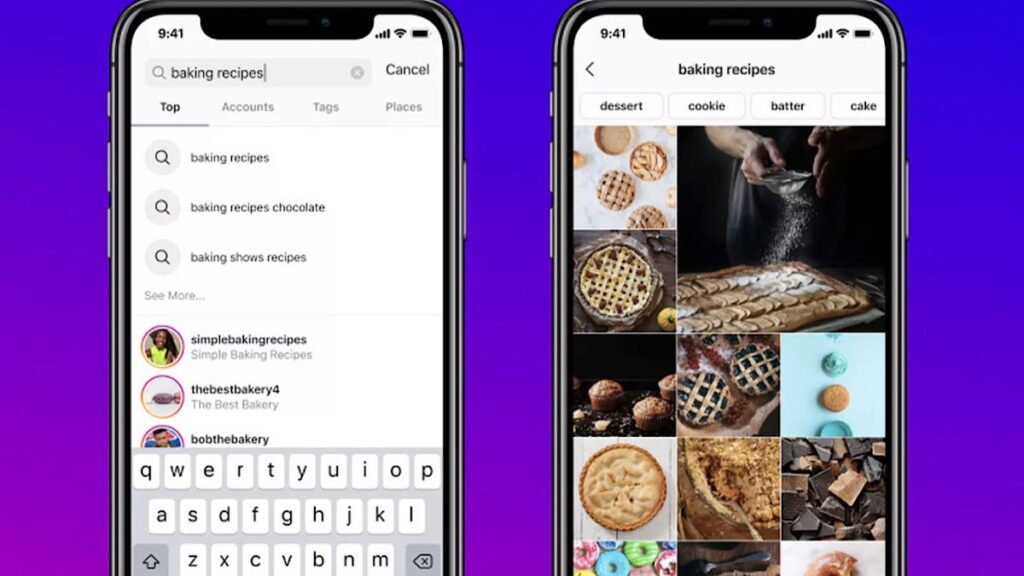
Searching Instagram profile posts for keyword is one of the most practical skills anyone managing a brand, researching competitors, or hunting for content inspiration can develop. Instagram does not offer a simple built-in filter that lets you type a word and instantly pull matching posts from a single account. That limitation forces many people to scroll endlessly or abandon the effort.
This guide walks you through every realistic method available today so you can find relevant posts faster and with less frustration.
Why Searching Profile Posts by Keyword Matters
When you need to review a competitor’s content strategy, track brand mentions inside a specific account, or locate older posts that still perform well, keyword-level search inside a profile becomes essential. It helps you spot recurring themes, product launches, user-generated content, or seasonal campaigns without wasting hours.
Marketers, social media managers, and researchers use this skill daily to gather insights that feed into content calendars, competitor reports, and campaign planning.
Native Instagram Methods to Locate Posts
Instagram’s own tools are limited but still useful for quick checks.
Using the Profile Search Bar
On the mobile app, open any profile and look at the top of the posts grid. Some accounts display a small search icon. Tap it and type your keyword. Results appear as matching posts from that profile.
This feature is not available on every account and often works better on larger or verified profiles. Results can be incomplete, especially for older content.
Profile Grid Scrolling Combined with Hashtag Mentions
Open the profile and scan the grid while keeping your keyword in mind. When you spot a relevant post, tap it and check the caption and hashtags. This manual approach works for small accounts but becomes impractical once the profile exceeds a few hundred posts.
Exploring Tagged and Reels Tabs
Switch to the Tagged tab or Reels tab on the profile. These sections sometimes surface content that the main grid hides. Still, neither tab offers true keyword filtering.
Third-Party Tools That Make Keyword Search Easier
When native options fall short, external platforms fill the gap.
| Tool Type | Best For | Key Advantage | Limitation |
|---|---|---|---|
| Web-based search sites | Quick public profile scans | No login required for basic results | Rate limits on free plans |
| Social listening platforms | Competitor & brand monitoring | Advanced filters + historical data | Paid subscription required |
| Browser extensions | On-the-fly profile searching | Works directly on Instagram web | May break after Instagram updates |
| Analytics dashboards | Performance + keyword insights | Combines search with engagement metrics | Steeper learning curve |
Popular options include specialized Instagram search engines, social listening suites, and browser tools that add a keyword filter on top of any public profile. Always verify that the tool respects Instagram’s terms and only accesses public data.
Step-by-Step Process for Effective Keyword Search
Follow this practical sequence:
- Decide whether the profile is public or private. Private accounts limit you to native methods only.
- Start with Instagram’s built-in profile search if available.
- Move to a reputable third-party tool and enter the exact username plus your keyword.
- Apply date ranges when possible to narrow older versus recent posts.
- Export or screenshot the matching posts for later analysis.
- Cross-check results by opening a few posts directly on Instagram to confirm accuracy.
This workflow keeps the process efficient and reduces the chance of missing important content.
Practical Examples of Keyword Search in Action
Imagine you manage a fitness brand and want to see how a competitor used the phrase “home workout” over the past year. Searching their profile for that keyword reveals a cluster of posts from lockdown periods that still receive high engagement. You can then adapt the format for your own audience.
Another example: a travel agency checks a popular influencer’s profile for “Bali” posts. The search surfaces both sponsored and organic content, helping the agency decide whether a collaboration makes sense.
These real-world uses show why the ability to search Instagram profile posts for keyword delivers immediate strategic value.
Pros and Cons of Different Approaches
Pros of native Instagram methods
- Free and always available
- No risk of account restrictions
- Results feel authentic because they come straight from the platform
Cons of native methods
- Incomplete coverage of older posts
- No advanced filters
- Time-consuming on large profiles
Pros of third-party tools
- Faster results with better filtering
- Ability to export data
- Historical reach beyond what Instagram displays
Cons of third-party tools
- Many require paid plans for full access
- Occasional accuracy gaps
- Dependence on external services that can change
Common Mistakes to Avoid
Many people waste time by making the same errors:
- Searching only on mobile and ignoring the desktop web version, which sometimes offers different results.
- Using overly broad keywords that return hundreds of irrelevant posts.
- Forgetting to check Stories highlights or Reels, where valuable content often lives.
- Relying on a single tool without verifying findings on Instagram itself.
- Ignoring the difference between public and private accounts and expecting the same search power.
Avoiding these pitfalls keeps your research accurate and efficient.
Best Practices for Consistent Results
Adopt these habits for better outcomes every time:
- Combine short exact-match keywords with longer phrases to catch both precise and related posts.
- Search during off-peak hours if using free tools that impose rate limits.
- Save useful posts to collections or external boards so you can revisit them later.
- Document the date and method of each search so you can repeat the process for ongoing monitoring.
- Respect privacy and Instagram’s guidelines—never attempt to access private content through unofficial means.
| Practice | Why It Helps | How to Apply |
|---|---|---|
| Use multiple keyword variations | Captures captions that use synonyms | Search “summer sale,” “summer deals,” and “summer promo” |
| Limit date ranges | Focuses on recent or seasonal content | Filter last 30, 90, or 365 days |
| Cross-verify top results | Confirms tool accuracy | Open 3–5 posts directly on Instagram |
| Schedule regular searches | Tracks changes over time | Set monthly reminders for key profiles |
Following these practices turns a frustrating task into a reliable research routine.
Advanced Tips for Marketers and Researchers
If you manage multiple accounts or run competitive analysis at scale, consider building a simple tracking spreadsheet. List the profiles you monitor, the keywords you care about, and the tools that work best for each. Over time you will notice patterns—certain accounts respond better to specific tools, while others are easiest to search natively.
You can also pair keyword search with engagement metrics. Once you locate matching posts, note likes, comments, and shares. This extra layer reveals which keyword-driven content actually resonates with the audience.
For teams, assign different keywords to different people and share findings in a central document. Collaboration prevents duplicate effort and surfaces insights faster.
Conclusion
Mastering how to search Instagram profile posts for keyword gives you a clear advantage whether you are analyzing competitors, gathering content ideas, or monitoring brand conversations. Native options provide a free starting point, while carefully chosen third-party tools unlock deeper and faster results.
By combining the methods, avoiding common mistakes, and following the best practices outlined here, you can locate the exact posts you need without endless scrolling. Start with one profile and one keyword today. The insights you uncover will quickly prove the value of this skill.
admin
Author & Content Strategist at Downgram.