Instagram Post Size Guide 2026: Best Dimensions, Aspect Ratios, and Image Sizes
Introduction
Choosing the correct instagram post size is one of the easiest ways to improve the quality and performance of your content. Whether you are a brand, influencer, business owner, or casual creator, using the right dimensions ensures your images appear sharp, professional, and optimized for every device.
Many creators spend hours designing beautiful graphics only to discover that Instagram crops important elements or reduces image quality. Fortunately, understanding Instagram’s recommended dimensions can prevent these issues.
In this guide, you’ll learn the ideal Instagram image sizes, aspect ratios, best practices, common mistakes, and tips for creating visually appealing content that looks great in every feed.
What Is the Ideal Instagram Post Size?
The ideal Instagram image dimensions depend on the type of content you plan to publish.
Recommended Instagram Image Sizes
| Instagram Format | Recommended Dimensions | Aspect Ratio |
|---|---|---|
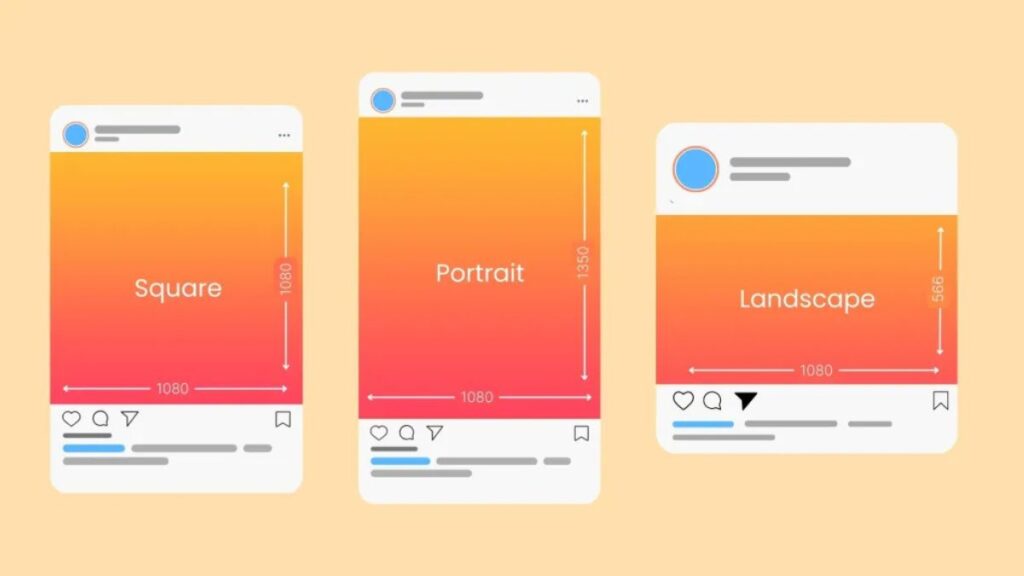
| Square Post | 1080 x 1080 px | 1:1 |
| Portrait Post | 1080 x 1350 px | 4:5 |
| Landscape Post | 1080 x 566 px | 1.91:1 |
| Story | 1080 x 1920 px | 9:16 |
| Reel Cover | 1080 x 1920 px | 9:16 |
| Profile Picture | 320 x 320 px | 1:1 |
Using these dimensions helps maintain image quality while minimizing unwanted cropping.
Why Post Dimensions Matter
Proper sizing helps:
- Improve visual appearance
- Maintain image clarity
- Prevent cropping issues
- Increase engagement potential
- Create a professional brand image
- Improve mobile viewing experience
When content fits Instagram’s specifications correctly, users can focus on your message rather than formatting problems.
Instagram Post Size for Different Formats
Instagram supports multiple post formats. Each serves a different purpose and requires specific dimensions.
Square Posts
Square images remain one of the most popular content formats.
Recommended size:
- 1080 x 1080 pixels
- 1:1 aspect ratio
Square posts work well for:
- Product photography
- Quotes
- Promotional graphics
- Brand announcements
Because they are symmetrical, they are easy to design and maintain consistency across a profile.
Portrait Posts
Portrait posts occupy more screen space, making them highly effective for grabbing attention.
Recommended size:
- 1080 x 1350 pixels
- 4:5 aspect ratio
Benefits include:
- Increased feed visibility
- Better mobile experience
- Higher visual impact
Many marketers prefer portrait posts because they dominate more of the user’s screen.
Landscape Posts
Landscape images are ideal for wide photography and panoramic visuals.
Recommended size:
- 1080 x 566 pixels
- 1.91:1 aspect ratio
Best uses include:
- Travel photography
- Team photos
- Event coverage
- Scenic images
However, landscape posts occupy less vertical space in feeds compared to portrait content.
Instagram Aspect Ratio Explained
Aspect ratio refers to the relationship between an image’s width and height.
Common Instagram Aspect Ratios
| Aspect Ratio | Format | Best For |
|---|---|---|
| 1:1 | Square | General content |
| 4:5 | Portrait | Engagement-focused posts |
| 1.91:1 | Landscape | Wide images |
| 9:16 | Stories & Reels | Full-screen content |
Understanding aspect ratios helps prevent distortion and ensures your visuals display properly.
How Aspect Ratios Affect Engagement
Different ratios create different viewing experiences.
Portrait images often:
- Take up more screen space
- Increase visibility
- Encourage longer viewing times
Landscape images often:
- Show broader scenes
- Work well for photography
- Provide cinematic aesthetics
Selecting the right ratio should align with your content goals.
Best Instagram Post Size for Businesses
Businesses often use Instagram to attract customers, showcase products, and build trust.
Product Images
For product-focused content, portrait images typically perform well because they maximize visibility.
Recommended size:
- 1080 x 1350 pixels
This format allows products to appear larger in the feed.
Promotional Graphics
Square formats are often ideal for:
- Sales announcements
- Discounts
- Product launches
- Event promotions
Their balanced layout makes them easy to read and visually appealing.
Brand Consistency
Consistent image dimensions help create a polished profile.
Benefits include:
- Better aesthetics
- Stronger brand identity
- Easier content planning
- Improved user experience
Many successful brands use a single preferred format throughout their content strategy.
How Instagram Compresses Images
Instagram automatically compresses uploaded images to improve loading speed.
What Happens During Compression?
Instagram may:
- Reduce file size
- Adjust image quality
- Reprocess uploaded visuals
Uploading oversized images does not always result in higher quality.
Best Settings Before Uploading
| Setting | Recommendation |
|---|---|
| Width | 1080 px |
| Color Space | sRGB |
| File Format | JPG or PNG |
| Compression | Moderate |
| Sharpness | Optimized for web |
Following these recommendations helps maintain image quality after upload.
Best Practices for Instagram Image Optimization
Optimizing your images involves more than selecting dimensions.
Use High-Resolution Images
Always start with high-quality source files.
Benefits include:
- Better clarity
- Improved professionalism
- Reduced pixelation
Leave Safe Margins
Avoid placing important elements too close to image edges.
This prevents:
- Cropping issues
- Text cutoffs
- Visual imbalance
Design for Mobile First
Most Instagram users browse on smartphones.
Focus on:
- Readable visuals
- Clear focal points
- Simple compositions
Maintain Consistent Branding
Use consistent:
- Colors
- Typography
- Layout styles
- Photography style
Consistency improves recognition and trust.
Instagram Carousel Post Size Guidelines
Carousel posts allow users to swipe through multiple images.
Recommended Carousel Dimensions
For best results:
- 1080 x 1350 pixels
- 4:5 aspect ratio
All slides should maintain identical dimensions.
Why Consistency Matters
Mixed image sizes can create:
- Cropping issues
- Uneven layouts
- Reduced professionalism
Consistency improves visual flow and user experience.
Carousel Content Ideas
Popular carousel formats include:
- Tutorials
- Step-by-step guides
- Before-and-after examples
- Product showcases
- Educational content
These formats often generate strong engagement because they encourage swiping.
Common Instagram Post Size Mistakes
Many creators unknowingly make sizing mistakes that reduce content quality.
Uploading Low-Resolution Images
Small images often appear blurry after Instagram processing.
Always use recommended dimensions.
Ignoring Aspect Ratios
Incorrect aspect ratios can lead to:
- Cropping
- Distortion
- Lost design elements
Using Oversized Files
Massive file sizes do not guarantee better quality.
Instead, they can slow down workflows and complicate uploads.
Placing Text Too Close to Edges
Critical information should remain inside safe zones.
This prevents accidental cropping across devices.
Pros and Cons of Different Instagram Post Sizes
| Format | Pros | Cons |
|---|---|---|
| Square | Easy to design, versatile | Less screen space |
| Portrait | More visibility, higher impact | Requires careful composition |
| Landscape | Great for wide images | Smaller feed presence |
| Carousel | Higher engagement potential | More design effort |
Each format serves a different purpose, making it important to choose based on content goals.
Best Practices for Maximum Results
Prioritize Portrait Posts
Portrait posts typically command more attention because they occupy more feed space.
Use Consistent Dimensions
Consistency creates a professional appearance across your profile.
Optimize Before Uploading
Prepare images using Instagram’s recommended specifications.
Test Different Formats
Monitor performance across:
- Square posts
- Portrait posts
- Landscape posts
- Carousel posts
Analytics can reveal what resonates most with your audience.
Keep Visuals Clean
Simple, uncluttered designs often outperform overly complex graphics.
Focus on a clear message and strong visual hierarchy.
Conclusion
Understanding the correct instagram post size can significantly improve the appearance and effectiveness of your content. Whether you’re posting product photos, promotional graphics, educational carousels, or lifestyle images, choosing the right dimensions ensures that your visuals look professional and display properly across devices.
For most creators, portrait posts at 1080 x 1350 pixels provide the best balance between visibility and engagement. However, square and landscape formats still have valuable uses depending on your content strategy.
By following the sizing recommendations, aspect ratios, and optimization tips outlined in this guide, you can create Instagram content that looks sharper, performs better, and delivers a more polished experience for your audience.
FAQs
1. What is the best Instagram post size?
The recommended size is 1080 x 1350 pixels for portrait posts because they occupy more screen space and often improve visibility.
2. What is the Instagram square post size?
Square posts should be 1080 x 1080 pixels with a 1:1 aspect ratio.
3. What size should Instagram carousel posts be?
Carousel images should ideally be 1080 x 1350 pixels, with all slides using identical dimensions.
4. Does Instagram reduce image quality?
Yes. Instagram compresses uploaded images, which is why using recommended dimensions is important.
5. Which aspect ratio performs best on Instagram?
Many marketers prefer the 4:5 aspect ratio because portrait posts take up more space in users’ feeds.
/ You May Also Read /
InfluencersGoneWild: What Happens When Social Media Fame Goes Too Far
admin
Author & Content Strategist at Downgram.